
For people who build for clients
Build the sites your competitors can’t.
Vitrine builds websites from scroll-driven sections we designed and tested in advance: pinned scenes, moving type, pictures that open as you scroll. Agency-level motion your clients will ask about. And it’s fast.
For freelancers, small studios and side projects. Free plan at launch.
A real scroll through a site made with Vitrine. The business is made up.
The motion
Motion clients notice. And pay for.
Scroll-driven sites usually mean custom code and a bigger budget. With Vitrine, that’s where you start. These are screen recordings of real sites made with Vitrine.
Built on the current canvas from one sentence, untouched.
Scroll them live, not on video
The businesses are made up for the demos and their images were generated with AI. Some recordings run slightly faster than real time.
That section is a Vitrine component running live on this page, not a video.
Scroll five more live sectionsNo two alike
Same brief. Three different sites.
We gave Vitrine the same sentence and the same photos three times in a row. These are the first screens it built, untouched.
The sentence“Petal & Stem is a small flower studio in Brooklyn. Weekly bouquets, wedding flowers, and a Sunday arranging workshop.”
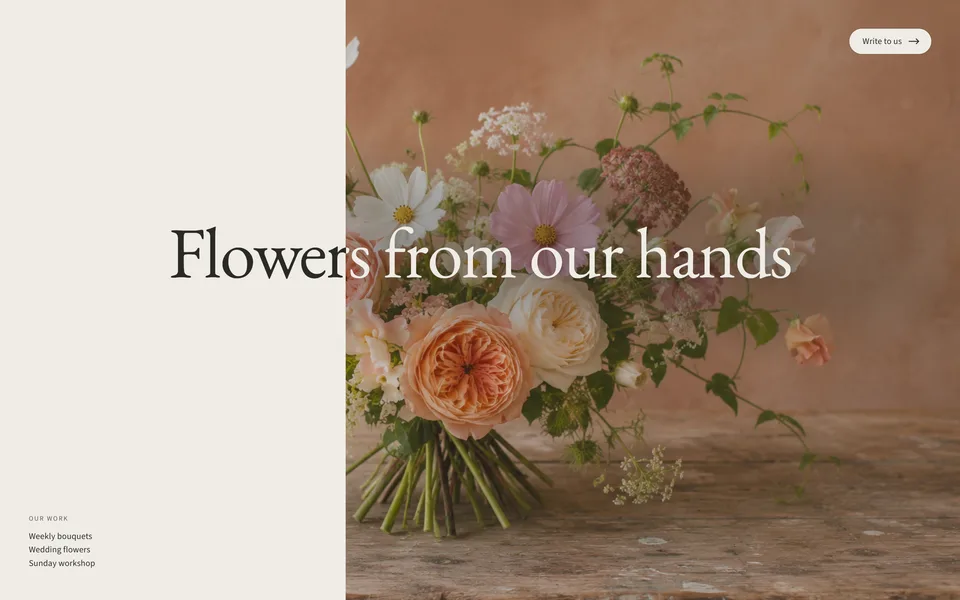
First buildSplit screen 
Second buildWords over a field 
Third buildBouquet, then one big word
Built on the current Vitrine canvas on November 15, 2026. The business is made up and its photos were generated with AI.
Client changes
When the client wants changes.
No tickets, no code. Real recordings from Vitrine with a made-up pottery studio. We’re still polishing, so small details may look different when you try it.
Click any words to change them
Click a heading or a line right on your site and type. Shorter and Rephrase ask the AI for another version. Nothing changes until you choose Save.
Ask for a new look
One sentence changes a section’s colors, fonts, text size, spacing or corners. The AI says what it changed; keep it or discard it, and undo it later if you change your mind.
Prices in one place
Type your prices once, under Content and Prices. Every price list on your site follows, and so does the business information search engines read.
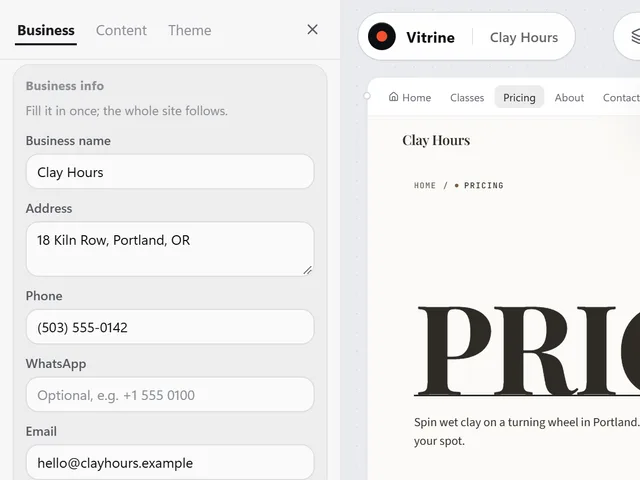
Your business details
Address, phone, email, opening hours and special dates in one panel. Change them once and every part of the site that shows them follows.
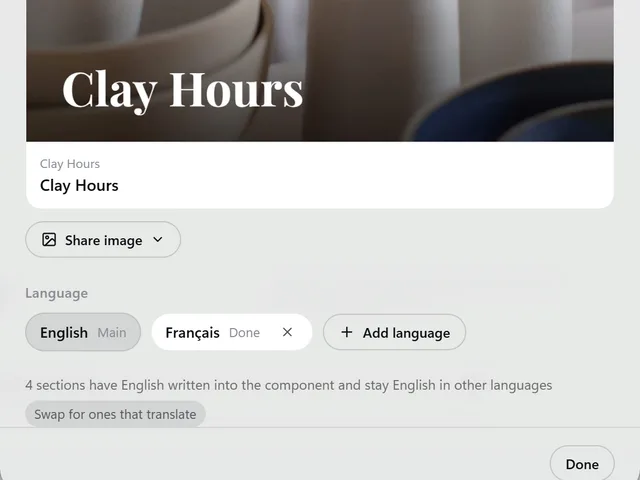
More than one language
Add up to three more languages and the AI translates your site. Your business name, prices and addresses stay as they are.
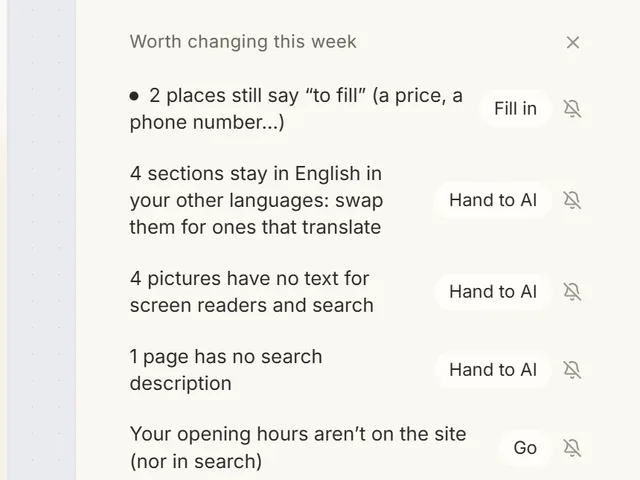
What’s worth doing next
A short list of what to look at, like a missing price or pictures without descriptions. Fill it in yourself or hand it to the AI.
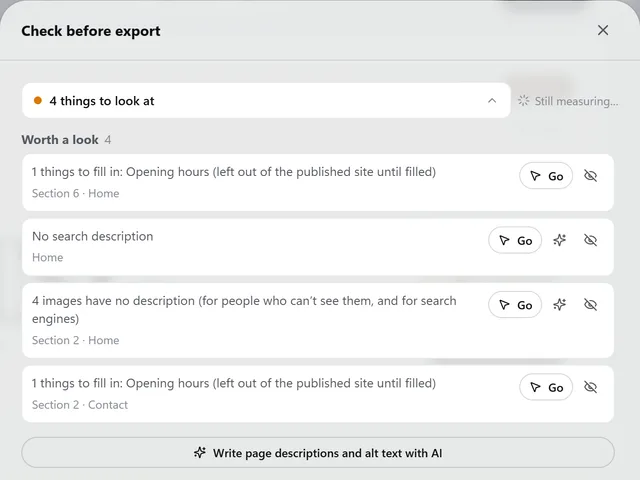
Check before you export
Blanks to fill, buttons that aren’t linked and pages nobody can reach, each with a button that takes you there.
And it’s fast
Describe the business. Get a first version.
Tell Vitrine about the business in a sentence or two. It asks what it needs to know, plans the pages and builds them. Then you shape it into the site your client shows everyone.
A real recording with a made-up pottery studio. The waits while the AI works are sped up.
Another live Vitrine component: the planet is wrapped in a photo, the words are ours.
Scroll five more live sectionsPricing
Priced for people who build for clients.
Studio exports every site you make, so every client gets their own folder of files. Personal covers one site of your own. Building and previewing is free.
Free
Try it on your own business
$0
No card needed.
- Build and edit sites on the canvas with AI
- 3 projects
- A daily AI allowance
- Preview links with a “Made with Vitrine” bar, for 7 days
- 200 MB for your images
- Not included: Export
Personal
For your own business
$24/month
Billed monthly, or $192 a year ($16/month).
- Everything in Free, plus:
- Export one site as a website folder
- 6× the daily AI allowance of Free (fair use)
- 3 projects
- Preview links without our bar, for as long as you subscribe
- 5 GB for your images
Best for client work
Studio
For freelancers and small studios
$49/month
Billed monthly, or $468 a year ($39/month).
- Everything in Free, plus:
- Export every site as a website folder
- 12× the daily AI allowance of Free (fair use)
- 25 projects
- Preview links without our bar, for as long as you subscribe
- 20 GB for your images
Prices in US dollars. Sales tax or VAT is added at checkout where it applies. Payments will be handled by Paddle, our reseller and Merchant of Record. Cancel any time; your plan keeps working until the end of the period you paid for. 14-day money-back guarantee on your first payment, see the Refund Policy. Vitrine is opening in stages: these are our launch prices, and people on the waitlist get in first.
Waitlist
Get in early.
Leave your email and tell us which plan you’d choose. We invite people from the waitlist first. Picking a plan doesn’t commit you to anything; it tells us what to get ready.
What is Vitrine, exactly?
A website builder for people who make sites for clients, and for owners who want a site that doesn’t look like a template. You describe the business in a sentence or two and answer a couple of questions. The AI plans the pages, writes the words and builds the site from scroll-driven sections, then puts it on a canvas, where you keep shaping it by clicking and chatting.
Can I build sites for my clients?
Yes, that’s what Studio is for. Make a site for each client, then export it as a folder of plain files and host it wherever your client wants. Our Terms allow client and commercial work; you’re responsible for what goes on your clients’ sites. The Free plan includes previews only, and Personal exports one site.
Won’t my site look like every other AI site?
That’s the problem we built Vitrine to fix. Sites are put together from a large library of sections we designed and tested in advance, chosen for your business, so the same words don’t lead to the same site. You can see it above: one brief, built three times.
Do I need design or coding skills?
No. You write in plain language and make changes the same way, or click the words on your site and type. The sections are designed and built in advance, so even the first version works and looks finished.
Can my site have more than one page?
Yes. The AI proposes the pages your site needs, such as Home, Classes, Pricing and Contact for a studio, and builds them one by one. Every page gets the same menu and footer. You can add, rename, reorder or remove pages on the canvas, or ask the AI to do it. How many pages you can have will depend on your plan.
Can my site be in more than one language?
Yes. Add up to three more languages and the AI translates your site. Your business name and facts like prices and addresses aren’t translated, and Vitrine keeps track of what needs updating when you change the original.
What do I get when I export?
A folder with your site as plain files: one HTML file per page, a 404 page, the JavaScript that runs the scroll effects, your fonts and your images. Upload it to any host that serves static websites and point your own domain at it.
Export is included in Personal (one site) and Studio (every site). The Free plan includes previews only.
Can visitors contact me or send a booking request?
You can add a contact form or a booking request form to any page and see it in the preview. Form messages are delivered only on sites published with Vitrine, and publishing isn’t available yet, so an exported site leaves its forms out. Until then, link your buttons to your email address or phone number.
Can Vitrine host my site?
Not yet. For now you export your site and host it wherever you like. Built-in hosting is on our list.
How does Vitrine use AI?
The AI asks about your business, plans your pages, writes your site’s words, picks and arranges the sections, links your buttons, translates your site and makes the changes you ask for on the canvas.
When you use an AI feature, your request, the relevant parts of your site and any images involved are sent to our AI provider, DeepSeek, which processes them on servers in China. Please don’t put sensitive personal information in your requests. We don’t use your content to train our own models. The Privacy Policy has the details.
Who owns the site I make?
You do. Your words, your images and the sites you make are yours. Sites you export on a paid plan are yours to host and use anywhere, and the sections inside them are licensed to you for use in those sites.
What happens to my data?
Your account and projects are stored in the United States. We don’t sell your data or use it for advertising, and this website uses no tracking cookies. You can delete your account at any time and we delete your data within 30 days.
For the waitlist we keep only your email, your plan choice, who you build sites for if you tell us, the sign-up date and your country.
Can I get a refund?
Yes. If Vitrine isn’t right for you, ask within 14 days of your first payment for a full refund, no reason needed. Annual renewals can also be refunded within 14 days. Monthly renewals aren’t refunded, but you can cancel any time. See the Refund Policy.
When can I start?
We’re opening Vitrine in stages, starting with people on the waitlist. Join and we’ll email you when your invite is ready.